Acceptance Stage
Purpose
The Acceptance Stage is a crucial automated quality gate that validates whether the system meets business requirements and user expectations. It replaces traditional manual QA testing with automated acceptance tests, providing:
- Rapid feedback on system behavior (within 1 hour vs. days for manual testing)
- Consistent validation of business requirements
- Regression safety at the system level
- Enablement for Acceptance Test-Driven Development (ATDD)
As Dave Farley emphasizes, a 1-hour acceptance test cycle is acceptable and provides a significant improvement over manual QA that takes days. While manual testing gives confidence through human intuition, automated acceptance tests provide rapid, reliable feedback about system behavior from a business perspective.
Architecture Overview
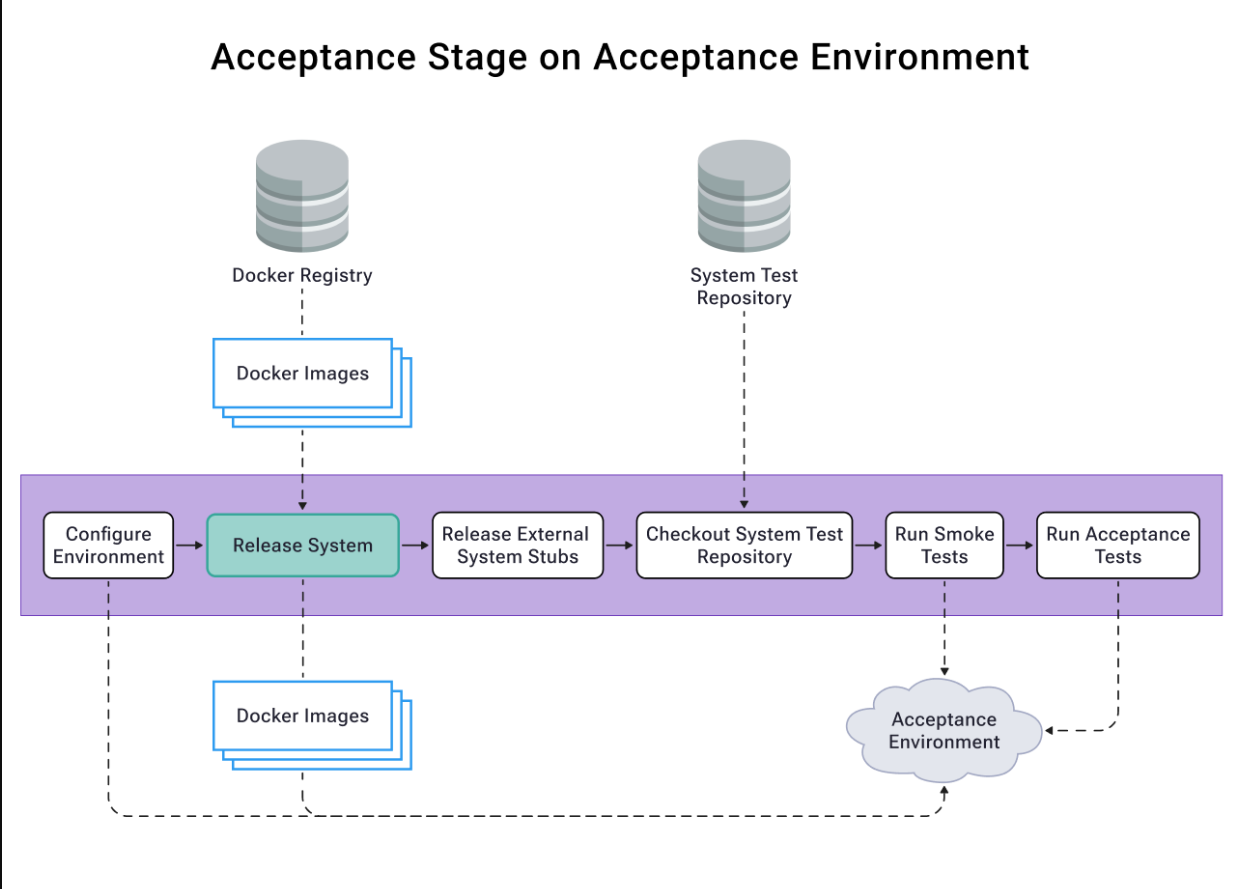
The acceptance stage runs on a dedicated acceptance environment, pulling:
- Docker images from the registry
- System tests from the test repository
- Configuration and state management
Four-Layer Acceptance Test Model
Our acceptance tests follow a four-layer architecture that focuses on WHAT the system does rather than HOW it does it:
-
Features Layer (
/features)- Business-readable scenarios in Gherkin
- Describes system behavior from user's perspective
- Serves as living documentation
-
Step Definitions (
/step_definitions)- Bridges between Gherkin and DSL
- Business-oriented language
- No technical implementation details
-
Domain-Specific Language (
/dsl)- Business-oriented abstraction layer
- Encapsulates system interactions
- Provides reusable business operations
-
Drivers (
/drivers)- Technical implementation details
- Handles system interaction mechanics
- Isolates technical complexity
Benefits of this approach:
- Clear separation between WHAT and HOW
- Tests remain stable despite UI/technical changes
- Business stakeholders can understand and contribute
- Reduced maintenance overhead
- Improved test reliability
Stage Components
1. Environment Setup
- Automated environment configuration
- State file management for version tracking
- Integration with Docker registry
2. System Tests
- Smoke tests for basic system health
- End-to-end acceptance tests
- Backend connectivity diagnostics
- State-based version tracking
3. Test Execution Strategy
Smoke Tests First Approach
The term "smoke test" originates from electronics, where the first test was to power up a circuit and check if it smoked. In software, we apply the same principle:
- Run quick, high-level smoke tests before detailed acceptance tests
- Fail fast if basic system functionality is broken
- Avoid wasting time running full acceptance suite if system is fundamentally broken
- Provide rapid feedback about critical issues
Our implementation:
# Smoke test execution
if ! npm run test:smoke --prefix ./system-tests-repo; then
    echo "Smoke tests FAILED - stopping here"
    exit 1 # Don't proceed to acceptance tests
fi

# Only run acceptance tests if smoke tests pass
npm run test:acceptance --prefix ./system-tests-repo
Benefits of this approach:
- Early detection of major issues (typically within 2-3 minutes)
- Resource optimization by preventing unnecessary test runs
- Quick feedback loop for critical failures
- Cost-effective test execution strategy
Full Test Execution
- Scheduled runs every 15 minutes
- Concurrency management to prevent test overlap
- Version-based test triggering
- State persistence for test results
4. Quality Gates
- Smoke test suite passing
- Acceptance test suite passing
- Version state management
- Environment health checks
Implementation
- Workflow:
digital-kudos-wall/.github/workflows/acceptance-stage-uat.yml - System Tests:
digital-kudos-wall-system-tests/src/acceptance
Example Successful Run
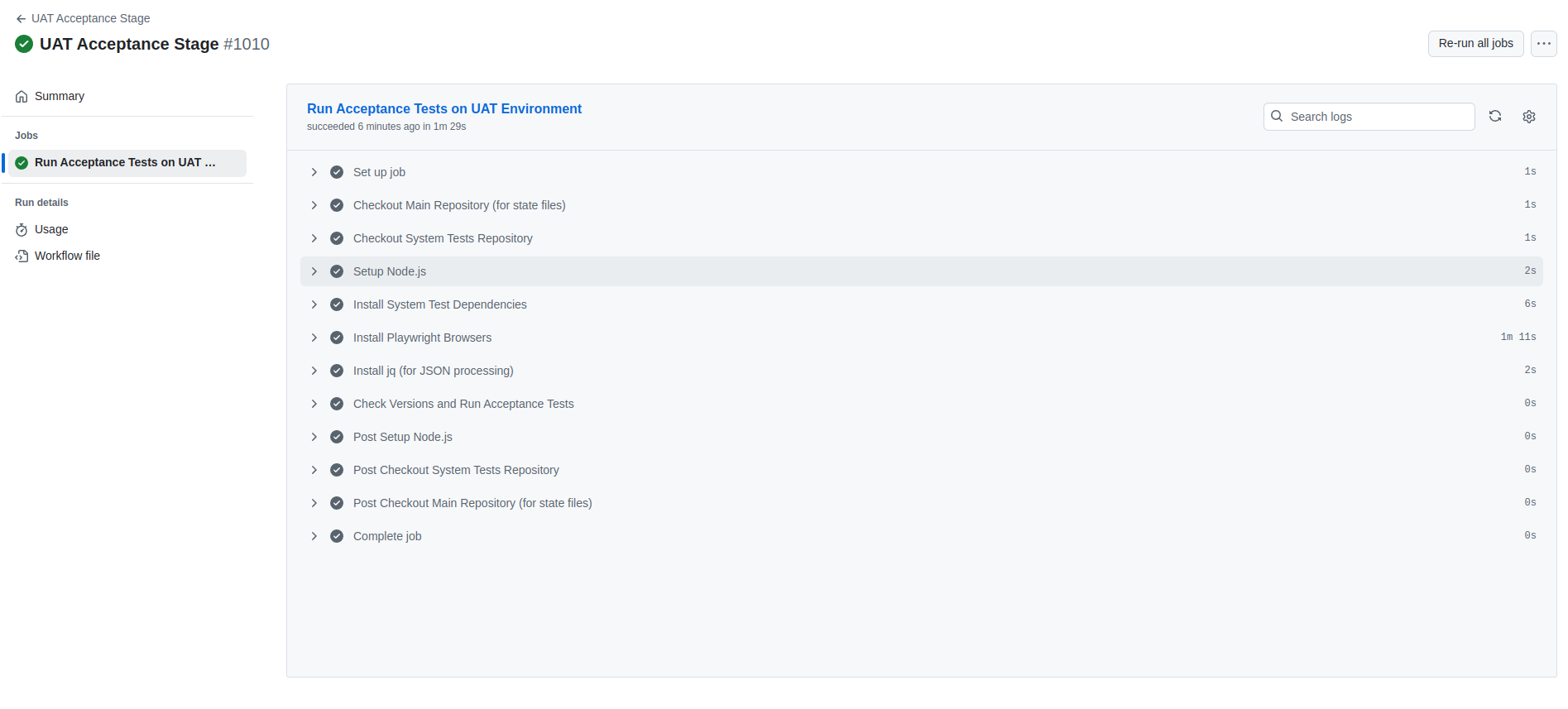
A successful acceptance stage run includes:
- Environment setup and configuration
- System test repository checkout
- Test dependency installation
- Version state management
- Smoke test execution
- Acceptance test execution
- State file updates
Test Execution Model
The acceptance stage follows a smart execution model:
- Checks for newly deployed versions
- Compares against last successfully tested versions
- Only runs tests when versions change
- Updates state files after successful runs
- Maintains test history through state management
Common Issues and Solutions
-
Environment Stability
- Regular health checks
- Automated environment reset
- State-based version tracking
-
Test Reliability
- Four-layer architecture reduces flakiness
- Business-focused scenarios
- Abstracted technical details
-
Performance
- Parallel test execution
- Smart test triggering
- Efficient state management